3D Models
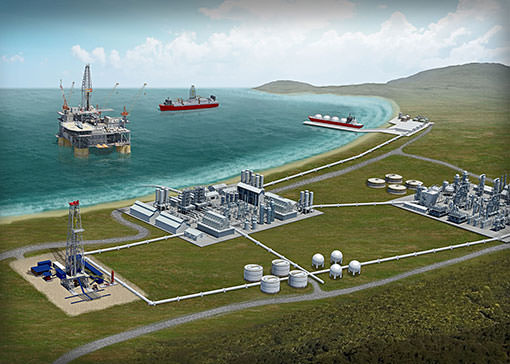
In this section I will try to cover the basics of what I am able to do with 3D models to help give you an idea of what I can offer you as a client. These first examples are from a project I did for a large energy company. There are ten wells going into the ground through a gas reservoir. The project consisted of fly-arounds of the object from all angles rendered in 3D and taken into flash. Once in flash, I created a user interface which allows the user to navigate to the desired section of video. The final product is a self contained file that can be run on virtually any computer, as flash is limited to use on a computer. Well labels and directions were also added in Flash. Other possibilities include video small enough to be included on a web site and the adding of sound through After Effects. I can also create DVD's which will work with a TV DVD player but have less interactivity.
Once a model is created, you are able to render still images or video, depending on the need. You can also combine these in other programs to create many great effects.
What to model
I mainly create static models. This means I do not create large animations with people walking around. My models usually consist of the main focus and some type of background. In the example on the right, there is a sculpture I designed and eventually built in small scale out of aluminum. The background is the building and sidewalk area that it was designed for. I am able to create movement of static objects as well as any camera angle or lighting needed. Further effects can be created in After Effects as you will see if you watch the video of this project through the link below. The different surfaces can be manipulated to achieve different levels of shine and reflectivity to mimic various materials such as metal or plastic. The different textures are created by mapping images over the desired surface as shown by the grass and brick. The end of the video shows a wire frame of the model, then fades into the "flat shade" of the model, and finally fades into the final version of the model with all the textures applied.
I hope this short explanation has helped. Please check out the final video for this project below. If you have any further questions, feel free to send me an email.
Click the image to watch the movie.
|
|
|
|